
CyberQP: AI-Native Privileged Access Management Platform
CyberQP offers an AI-native privileged access management (PAM) platform that consolidates all eight phases of privileged access control into a single automated solution, addressing common challenges like the need for multiple separate tools, manual processes, and incomplete implementations that leave many admin accounts unsecured.


AI-NATIVE PRIVILEGED ACCESS MANAGEMENT
The complete AI-native PAM platform.
Every phase of privileged access in one platform — and an AI agent that does the work to get you to zero standing privilege.


THE PROBLEM
You know you need to lock down admin access. Here's why it never gets done.
Real privileged access management isn't one product — it's eight phases of work. Almost every IT team starts. Almost none finish.
01
It takes five or six separate tools
Finding privileged accounts, vaulting them, rotating them, handling elevation — each one is its own product to license, learn, and maintain.
02
And all of it runs by hand
Every account, every rotation, every approval is manual. Manual work always loses to whatever's on fire today.
03
So you stall halfway
A few things locked down, most still exposed — and no clean way to prove which is which.
.svg)
SEE IT IN ACTION
Watch Panthera run privileged access for you.

Panthera: AI-Native Privileged Access Management for MSPs from Jim Jessup on Vimeo

Playing in picture-in-picture
Like
Add to Watch Later
Share
Embed
Play
00:00
02:55
Settings
Speed
QualityAuto
2x
1.5x
1.25x
1x
0.75x
0.5x
Picture-in-Picture
Fullscreen

Maturity score overview

Credential discovery run

Just-in-time access in action

Audit trail and alerting

PAM MATURITY JOURNEY
Eight phases to zero standing privilege.
1
Phase 01
Discover & Assess
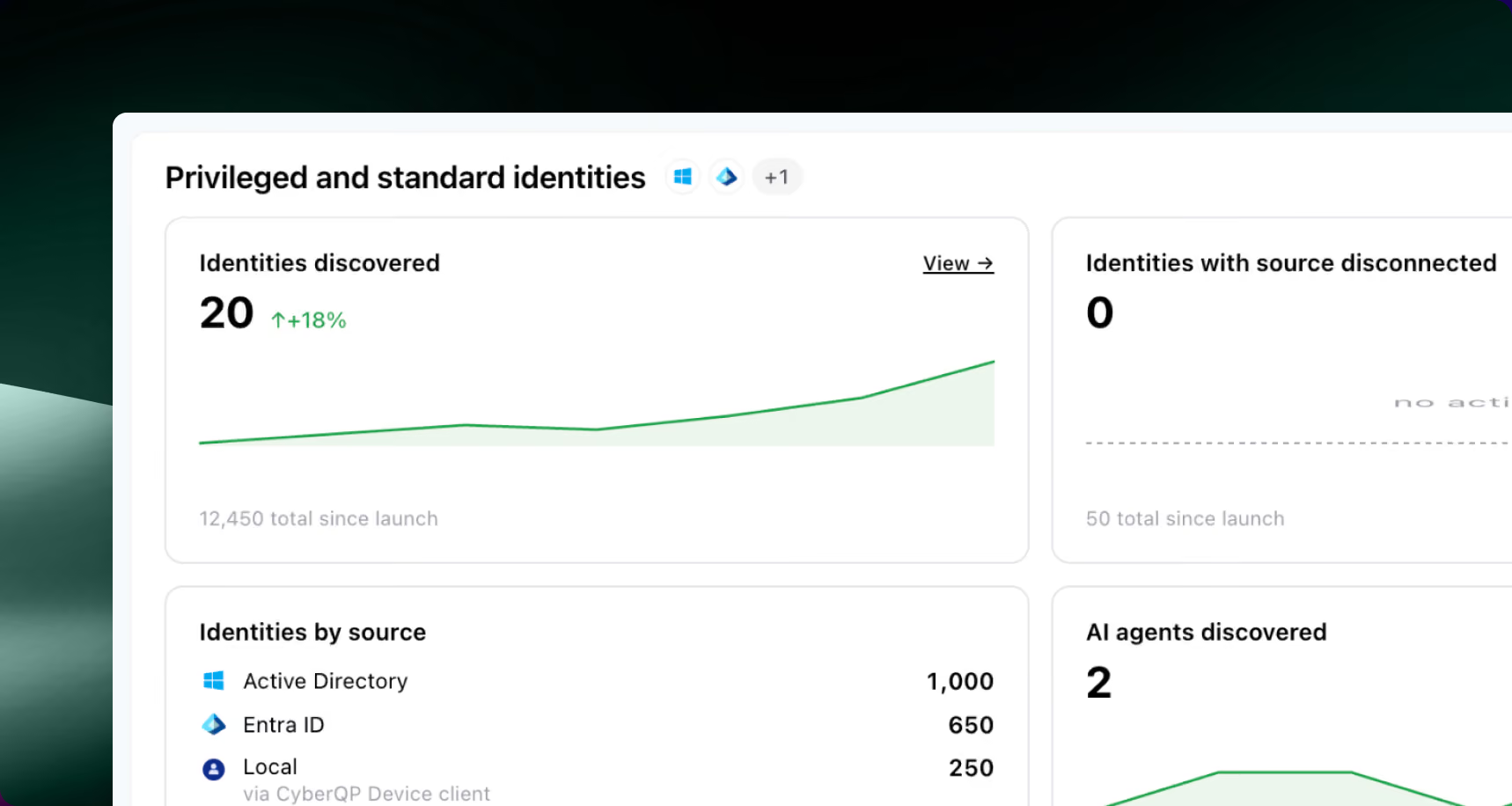
PHASE 01
Discover & Assess

The problem
You can't lock down what you can't see — and the riskiest accounts are the service accounts and non-human identities no one has inventoried.

What Panthera Solves
Continuously discovers every privileged identity, human and non-human — on-premises, cloud and AI service accounts, and end users holding admin rights, on Windows and macOS — and flags the risky ones for you.


2
Phase 02
Remediation of Privileged Access
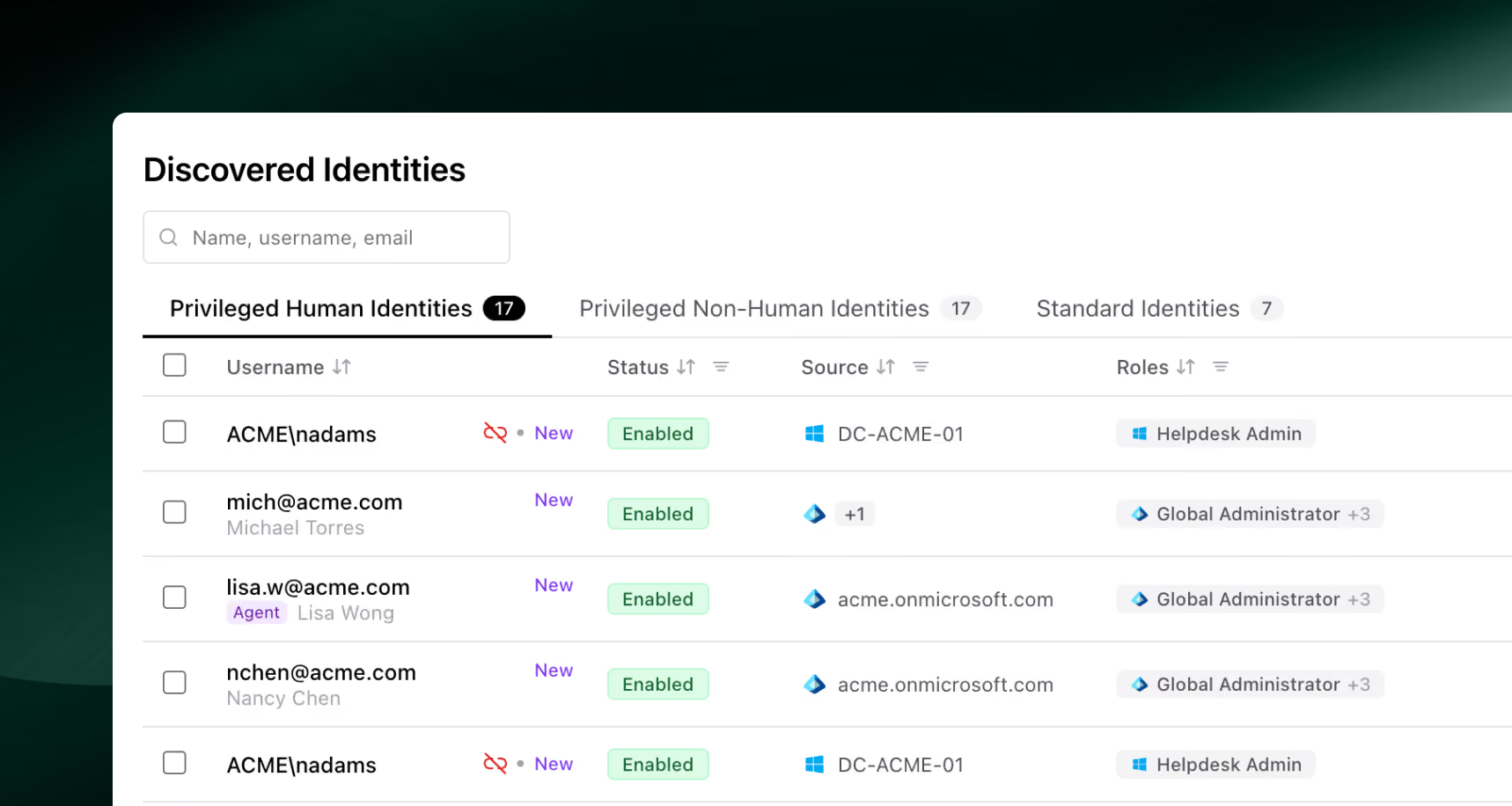
PHASE 02
Remediation of Privileged Access
The problem
Stale, orphaned, and over-privileged accounts pile up faster than anyone can clean them by hand.
What Panthera Solves
Removes, disables, or right-sizes risky access — including the admin rights people were never supposed to have — each change behind your approval.
3
Phase 03
Zero-Knowledge Credential Vault
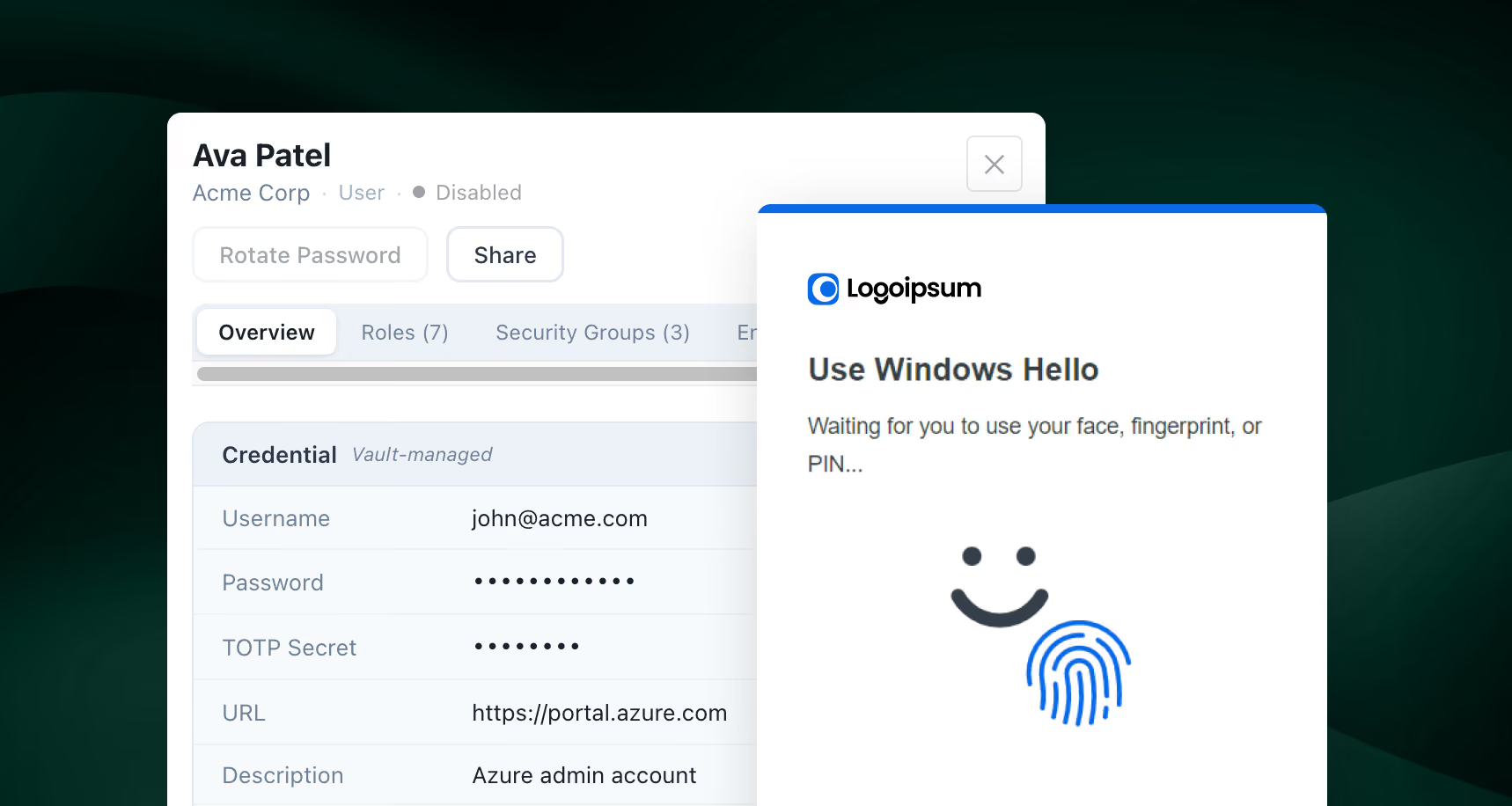
PHASE 03
Zero-Knowledge Credential Vault
The problem
Credentials live in spreadsheets, scripts, and config files where too many people can reach them.
What Panthera Solves
Pulls every privileged credential, API key and token into a zero-knowledge vault. CyberQP doesn't hold the encryption keys, so even we can't read it.
4
Phase 04
Zero-Knowledge Credential Rotation
PHASE 04
Zero-Knowledge Credential Rotation
The problem
Nobody remembers to rotate passwords, so shared and service-account credentials sit unchanged for months.
What Panthera Solves
Rotates shared and service-account credentials automatically, on a schedule or after each use — without ever breaking zero-knowledge.
5
Phase 05
MFA & Secure Access Enforcement
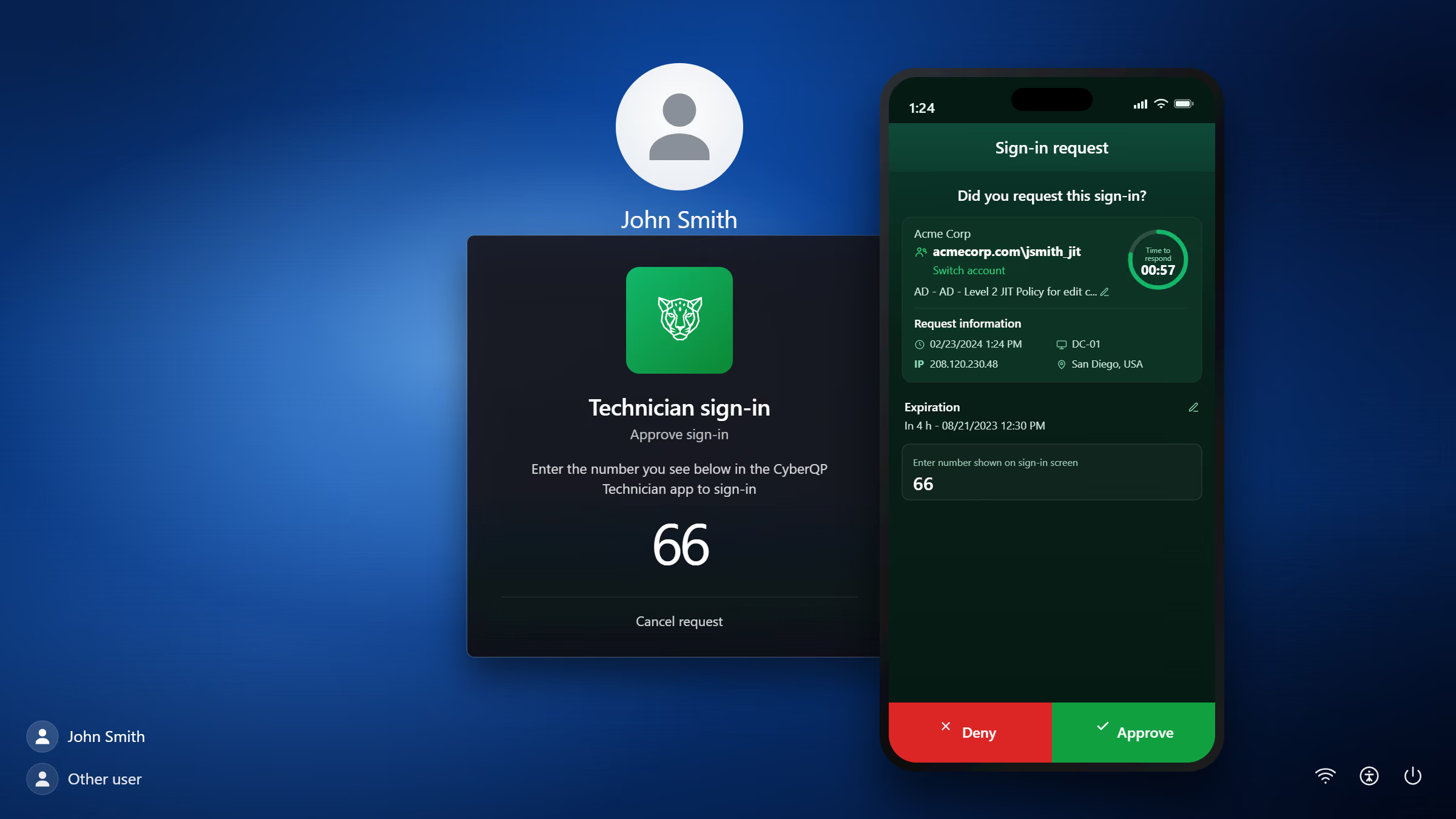
PHASE 05
MFA & Secure Access Enforcement
The problem
MFA coverage is patchy and hard to prove across every endpoint and tool.
What Panthera Solves
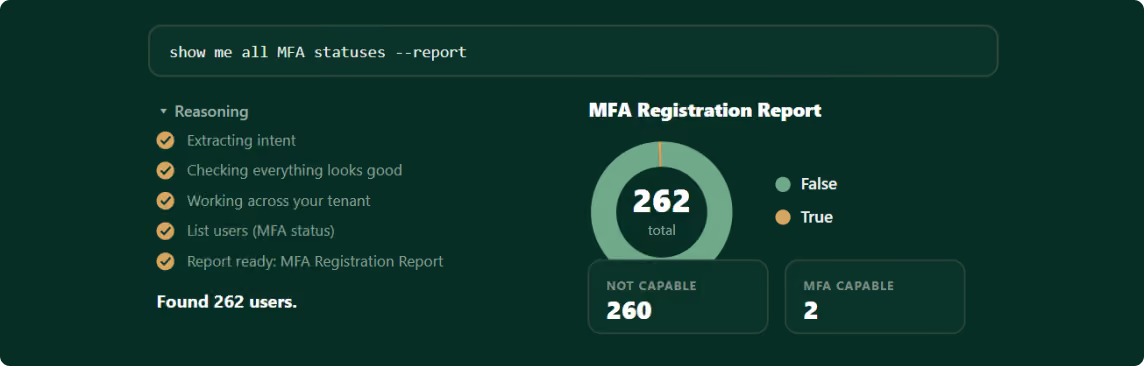
Enforces MFA on privileged access and reports coverage across every identity — so you can see who isn't protected and prove it on demand.
6
Phase 06
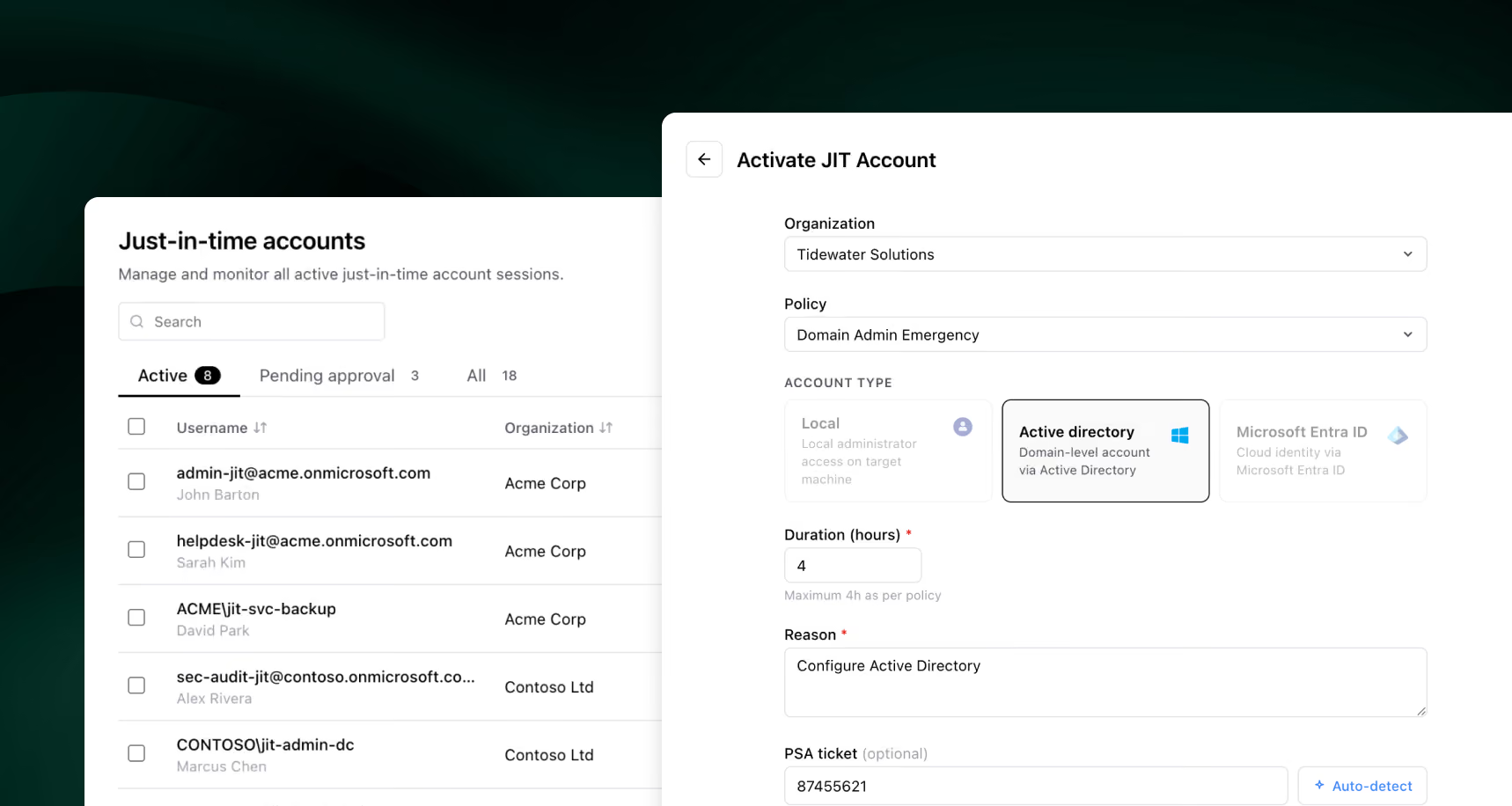
Just-in-Time Access & Zero Standing Privilege
PHASE 06
Just-in-Time Access & Zero Standing Privilege
The problem
Always-on admin accounts are the easiest thing for an attacker to find and abuse.
What Panthera Solves
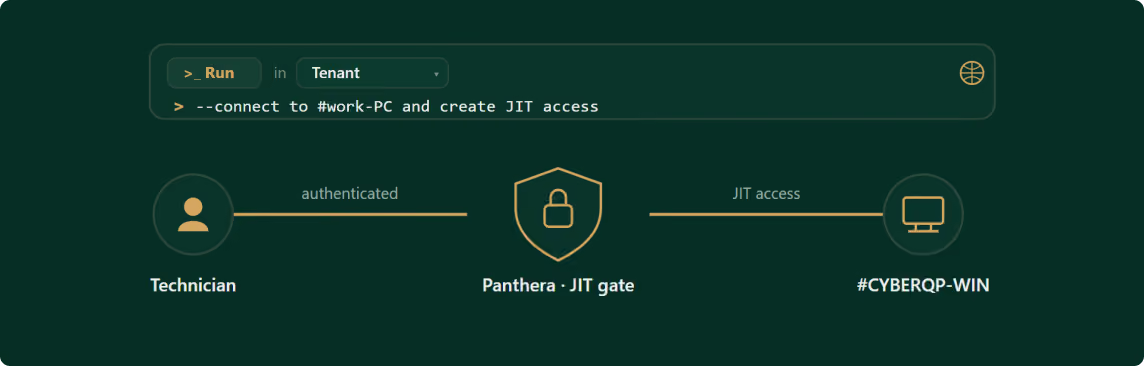
Gives each technician an account that's disabled by default, granted the least privilege the task needs across servers, workstations, AD, Entra ID, Microsoft 365 and Google Workspace, then disabled again — so there's nothing standing for an attacker to steal.
7
Phase 07
Auditing, Monitoring & Alerting
PHASE 07
Auditing, Monitoring & Alerting
The problem
When an auditor asks who did what, the evidence is scattered or missing.
What Panthera Solves
Logs every privileged action and access event — so the audit an insurer or auditor asks for is one plain-language question away, not a week of digging.
8
Phase 08
Endpoint Privilege Management
PHASE 08
Endpoint Privilege Management
The problem
Local admin rights stay on workstations because removing them breaks people's work.
What Panthera Solves
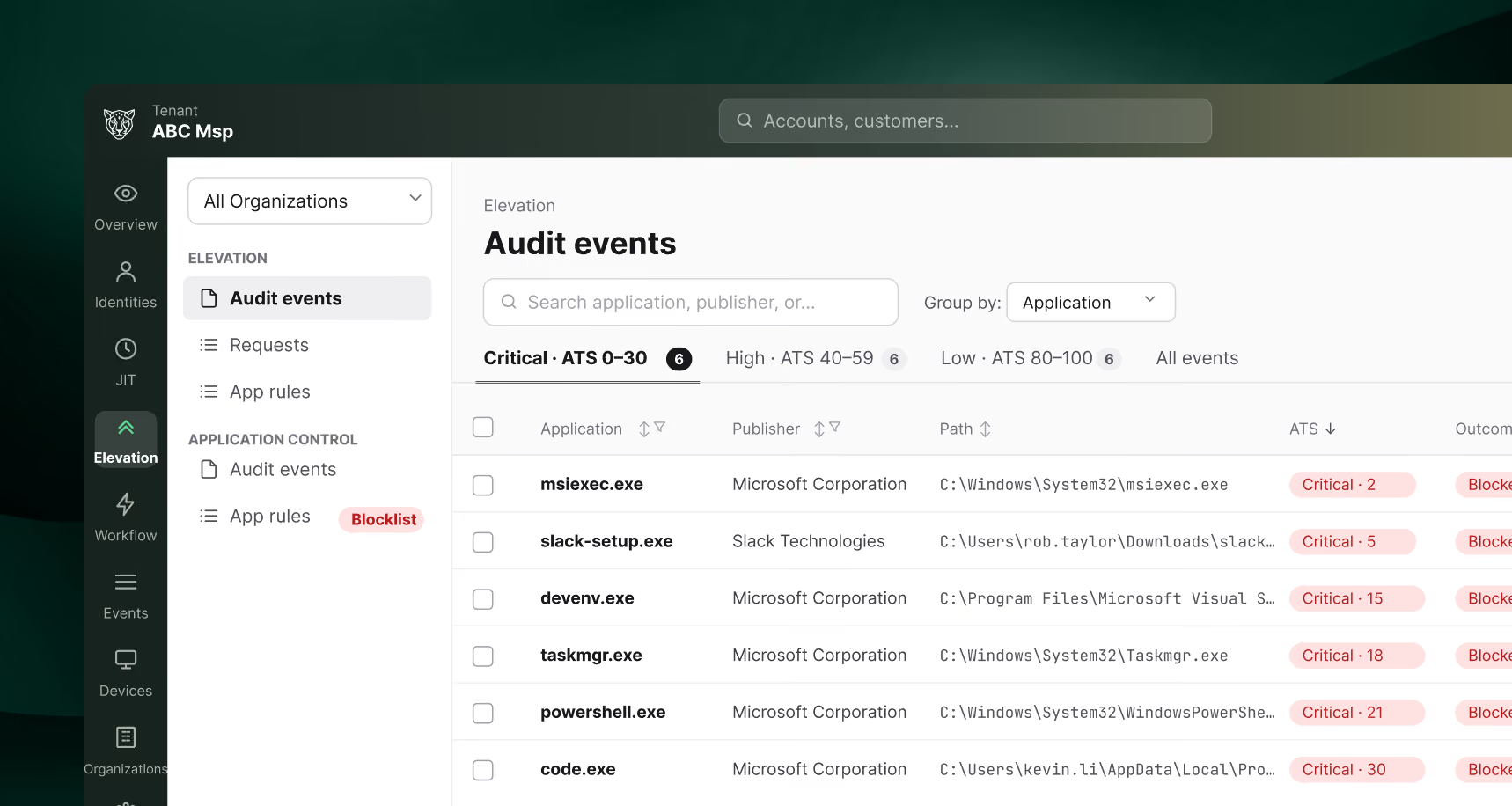
Removes standing local admin and auto-approves the safe elevations — each request risk-scored, so only the dangerous ones need a look.
PHASE 01
Discover & Assess
The problem
You can't lock down what you can't see — and the riskiest accounts are the service accounts and non-human identities no one has inventoried.
What Panthera Solves
Continuously discovers every privileged identity, human and non-human — on-premises, cloud and AI service accounts, and end users holding admin rights, on Windows and macOS — and flags the risky ones for you.
PHASE 02
Remediation of Privileged Access
The problem
Stale, orphaned, and over-privileged accounts pile up faster than anyone can clean them by hand.
What Panthera Solves
Removes, disables, or right-sizes risky access — including the admin rights people were never supposed to have — each change behind your approval.
PHASE 03
Zero-Knowledge Credential Vault
The problem
Credentials live in spreadsheets, scripts, and config files where too many people can reach them.
What Panthera Solves
Pulls every privileged credential, API key and token into a zero-knowledge vault. CyberQP doesn't hold the encryption keys, so even we can't read it.
PHASE 04
Zero-Knowledge Credential Rotation
The problem
Nobody remembers to rotate passwords, so shared and service-account credentials sit unchanged for months.
What Panthera Solves
Rotates shared and service-account credentials automatically, on a schedule or after each use — without ever breaking zero-knowledge.
PHASE 05
MFA & Secure Access Enforcement
The problem
MFA coverage is patchy and hard to prove across every endpoint and tool.
What Panthera Solves
Enforces MFA on privileged access and reports coverage across every identity — so you can see who isn't protected and prove it on demand.
PHASE 06
Just-in-Time Access & Zero Standing Privilege
The problem
Always-on admin accounts are the easiest thing for an attacker to find and abuse.
What Panthera Solves
Gives each technician an account that's disabled by default, granted the least privilege the task needs across servers, workstations, AD, Entra ID, Microsoft 365 and Google Workspace, then disabled again — so there's nothing standing for an attacker to steal.
PHASE 07
Auditing, Monitoring & Alerting
The problem
When an auditor asks who did what, the evidence is scattered or missing.
What Panthera Solves
Logs every privileged action and access event — so the audit an insurer or auditor asks for is one plain-language question away, not a week of digging.
PHASE 08
Endpoint Privilege Management
The problem
Local admin rights stay on workstations because removing them breaks people's work.
What Panthera Solves
Removes standing local admin and auto-approves the safe elevations — each request risk-scored, so only the dangerous ones need a look.
PROMPT TERMINAL
Introducing the Prompt Terminal™

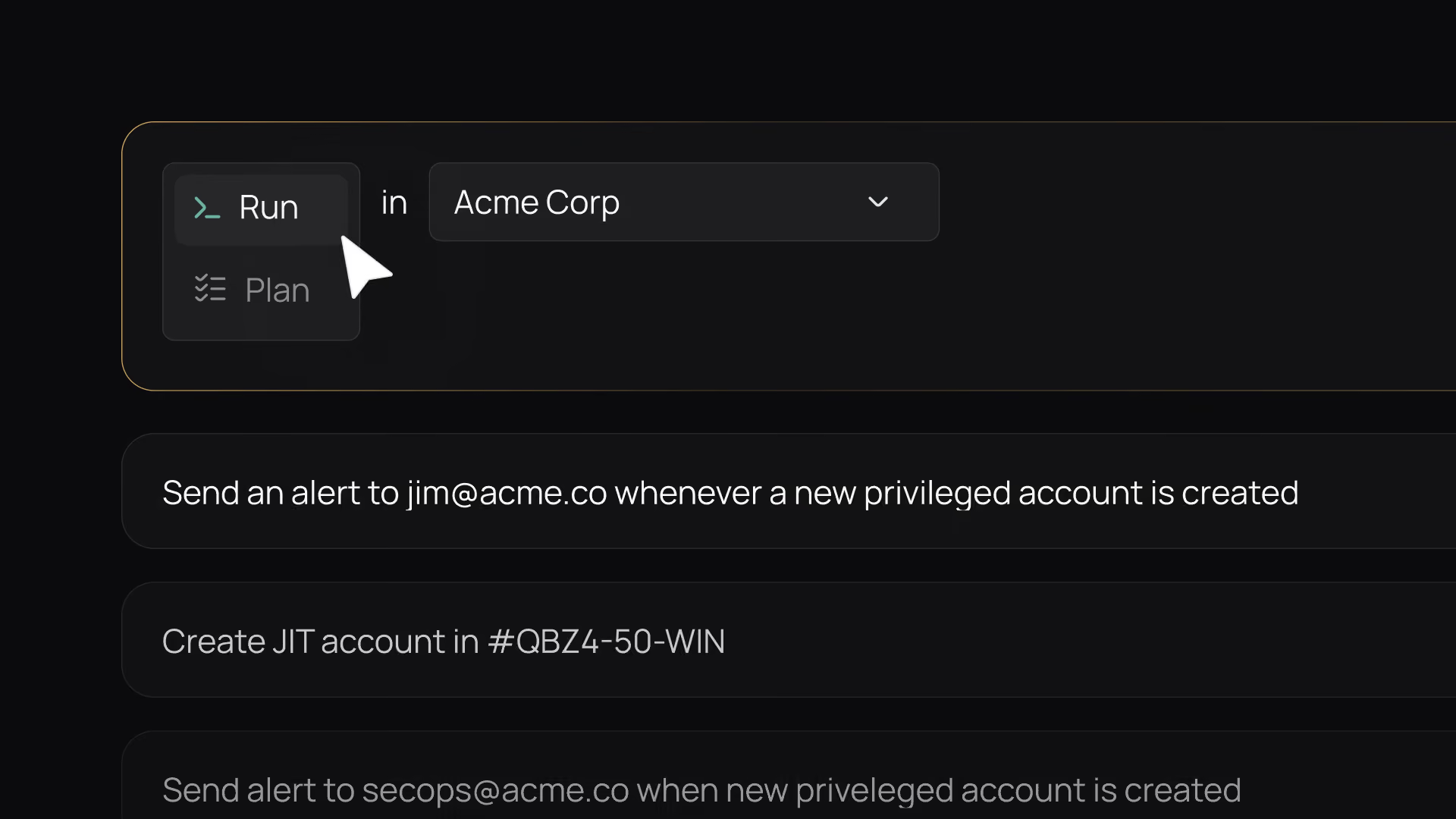
Run Mode
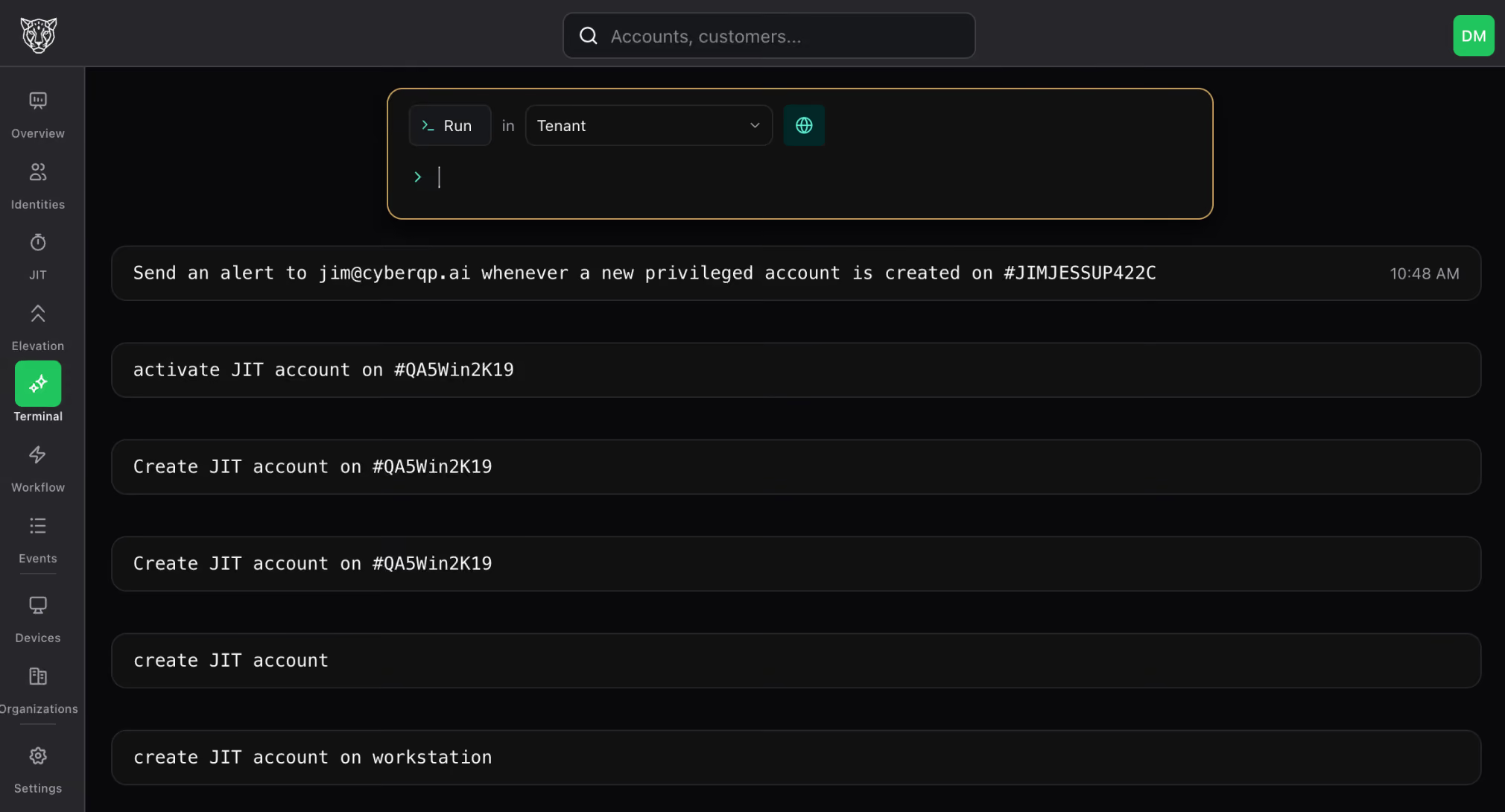
Technician-initiated work. Type a task and Panthera runs it now, across your connected tools, gated by your policies and written to the audit trail.

Plan Mode
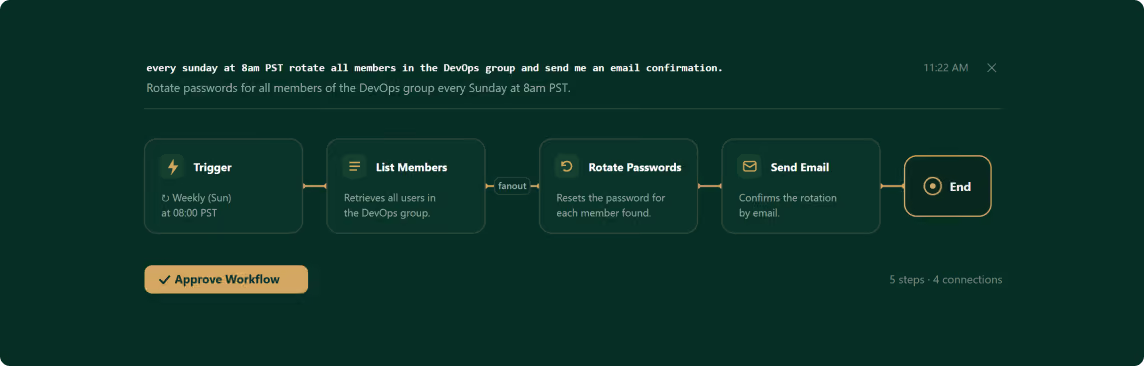
Workflow automation. Describe what should happen on a schedule or an event — "when a new privileged account appears, alert me and open a ticket" — and Panthera builds the automation, then runs it on the trigger.
AI ARCHITECTURE
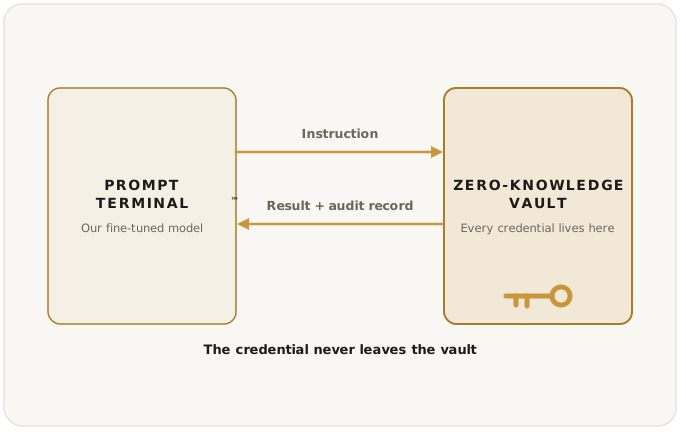
The AI agentic Harness runs privileged access. It never holds a credential.
A model we fine-tuned and host ourselves, behind a harness that decides what it's allowed to do.
01
The model is ours
Runs on a model we fine-tuned and host ourselves. Your privileged data never reaches a public model provider.
02
The credential never leaves the vault
Decides and orchestrates the work, then hands off. The vault holds the secret and stays zero-knowledge, even through rotation.
03
Nothing runs unauthorized
Checks every action against your roles and approvals, then writes it to the audit trail.
THE PLATFORM
The full PAM stack, run from a single prompt
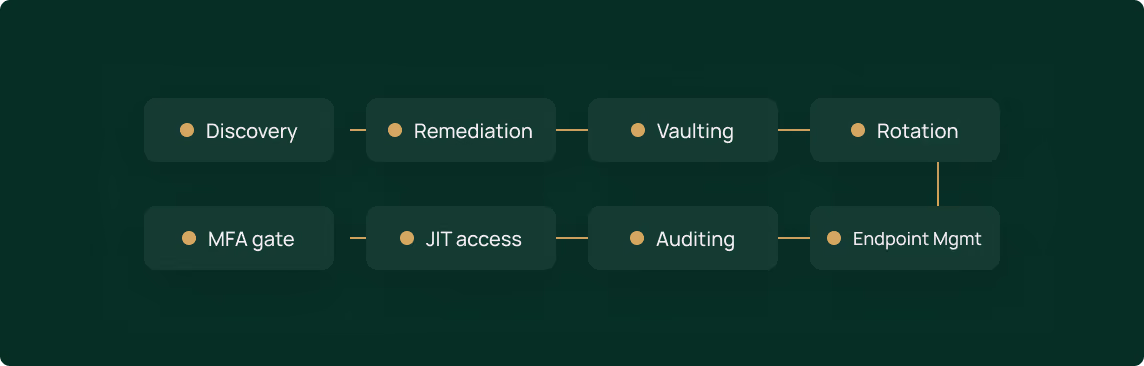
DISCOVERY
Continuous discovery of every human and non-human identity.
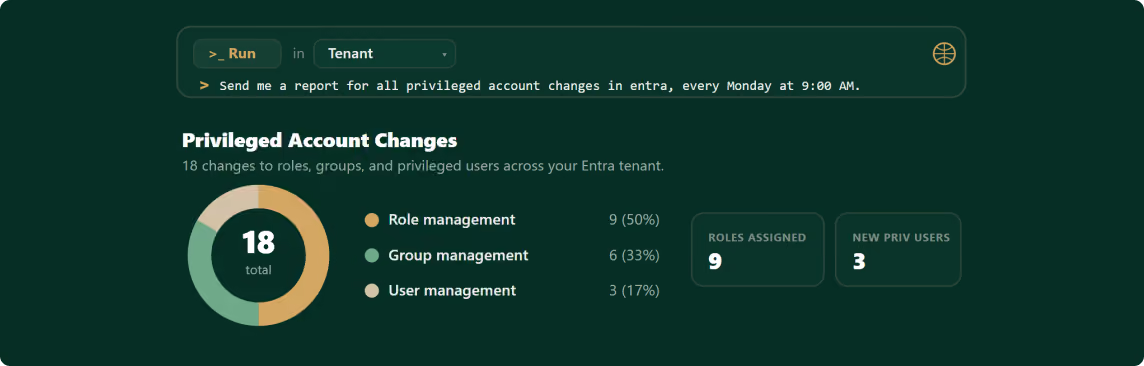
The work
Describe the outcome; the AI agent does the work.
Privileged access
Zero standing privilege — granted on demand, auto-revoked.
Compliance
Audit-ready evidence packages, generated for you.
Scope
Every phase of the PAM journey in one platform.
learn more
Get a copy of the Panthera Product Manifesto
Email *
reCAPTCHA
Recaptcha requires verification.
I'm not a robot
reCAPTCHA
Comments
reCAPTCHA
Integrations
Works with the stack you already run.
PSA Tools




RMM Platforms


Identity providers



Endpoint client support


COMPLIANCE & SECURITY POSTURE
Prove your privileged-access controls are enforced
Bring the control you need to satisfy — SOC 2, ISO 27001, a cyber-insurance questionnaire, a one-off auditor ask, and Panthera checks whether your privileged-access controls are actually enforced, then helps you close any gap in the platform. You get the privileged-access evidence auditors ask for, generated on demand — not a GRC platform, a PAM system that proves its own controls.


SOC 2 Type II
Generates the privileged-access evidence your SOC 2 Type II audit requires.

ISO 27001
Maps privileged-access controls to ISO 27001 access-control requirements.

HIPAA
Evidences privileged-access controls relevant to HIPAA security requirements.

CMMC
Supports privileged-access requirements within CMMC assessments.

GDPR
Supports EU data-privacy obligations for personal data.

Cyber Insurance
Automated reporting to speed up cyber-insurance renewals.
Compliance stops being a fire drill. The evidence your auditors and insurers ask for is generated for you, on demand.
FAQ
Frequently Asked Questions
01
Is my data shared with model providers like OpenAI, Google, or Anthropic?

No. CyberQP runs its own fine-tuned LLM on its own infrastructure. Your data is never sent to a third-party model provider and is never used to train anyone's model — privileged data stays on our servers, under our protection, not theirs.
02
Can CyberQP — or anyone — see our stored credentials?
No. The vault is zero-knowledge: CyberQP doesn't hold the encryption keys, so we can't read your credentials in plain text — including while Panthera rotates them.
03
Is the AI safe to run against privileged systems?
Yes. The model is fine-tuned and runs on our own infrastructure, not a third-party API, so your privileged data never leaves your control. Every action the agent takes is permission-scoped, logged, and can require human approval before it runs.
04
What is zero standing privilege?
It means no account carries admin rights around the clock. Access is created the moment it's needed, scoped to the task, and removed when the task is done — so there's nothing standing for an attacker to steal or abuse.
05
How does just-in-time access work?
Each technician gets a dedicated privileged account that stays disabled, with no privilege, by default. When work needs elevation, it's granted just-in-time with the least privilege the task needs — optionally behind a second approver — then disabled again automatically. It works across servers, workstations, Active Directory, Entra ID, Microsoft 365 and Google Workspace, and every grant is logged.
06
Is Panthera multi-tenant?
Yes. Manage every client environment from one console — switch tenants without re-authenticating, with role-based access and clean separation between them. Set a policy at the parent level and it cascades to the orgs beneath it.
07
How is Panthera priced, and is the AI a separate add-on?
Panthera is licensed two ways, per technician and per workstation, and you can buy either or both. The AI is built in — no separate SKU, no per-token charge, and no platform or per-client fee. The pricing page shows how licenses get assigned.
08
Can we prove who did what across privileged access — including the AI?
Yes. Every privileged account use is logged — which account, who used it, what privilege, and for how long. Because the AI agent does the work, its actions are logged the same way, so your audit trail covers the automation, not just the people. And you don't dig through filters to find it: ask the prompt terminal in plain language, or set a recurring report — weekly privileged-account changes, elevation approvals and denials — and the evidence is generated for you on demand.
Three ways to see Panthera work
Webinar
Reaching Zero Standing Privilege
Jim Jessup and Stephan Tomecko walk through discovery and vaulting: finding privileged accounts across every tenant, then vaulting credentials CyberQP cannot read. 25 minutes, with live Q&A.
Product tours
Click through Panthera yourself
Self-guided walkthroughs of discovery, vaulting, just-in-time access and credential rotation. Go at your own pace, no call required.
Live demo
Walk your own environment with an engineer
A CyberQP engineer runs Panthera against your own Active Directory, Entra ID, Microsoft 365 and Google Workspace, then shows you where standing privilege is hiding.
Run Panthera on your own environment

30 days free trial
No credit card required
Products
Pricing QGuard QDesk Integrations Product Tours Product Roadmap Release Notes
Products
Submit a Ticket Partner Portal Trust Center Knowledge Base
Company
Company Leadership Contact Careers
Resources
Resource Hub Blog White Papers eBooks Webinars Success Stories


© 2026 CyberQP Inc. All rights reserved.
Privacy Policy Terms & Conditions Cookie Policy Consent Preferences